
Rebuilding for an
AI-Enabled Future
In this exciting case study I returned to my UMB modernization work to perform advanced analysis on the use of AI. I would test AI models viability and efficiency for use in updating UMB's legacy symbol library into a modern, token-driven design system. My analysis for this self-study also included designing complex high fidelity screens with agentic AI implementation for enterprises where compliance and risk are critical factors.
Case study.
INDEPENDENT STUDY
- Test AI use actual efficiency
- Uncover best use for AI models
- Understand depth of agentic AI usability in enterprise applications
- MCP connectivity
FOCUS
- Design System creation
- Utilizing AI to Design
- Agentic into enterprise applications
HUMAN ELEMENT
- Engineering hand off
- Risk, compliance and review
- Human need in decisions
- Human need in strategy
TOOLS
- Figma
- Claude
- ChatGPT
- MCP
Core Output
668
legacy symbols assessed
300
design tokens created
30
component sets
799
documented variants
121
core icons in two sizes
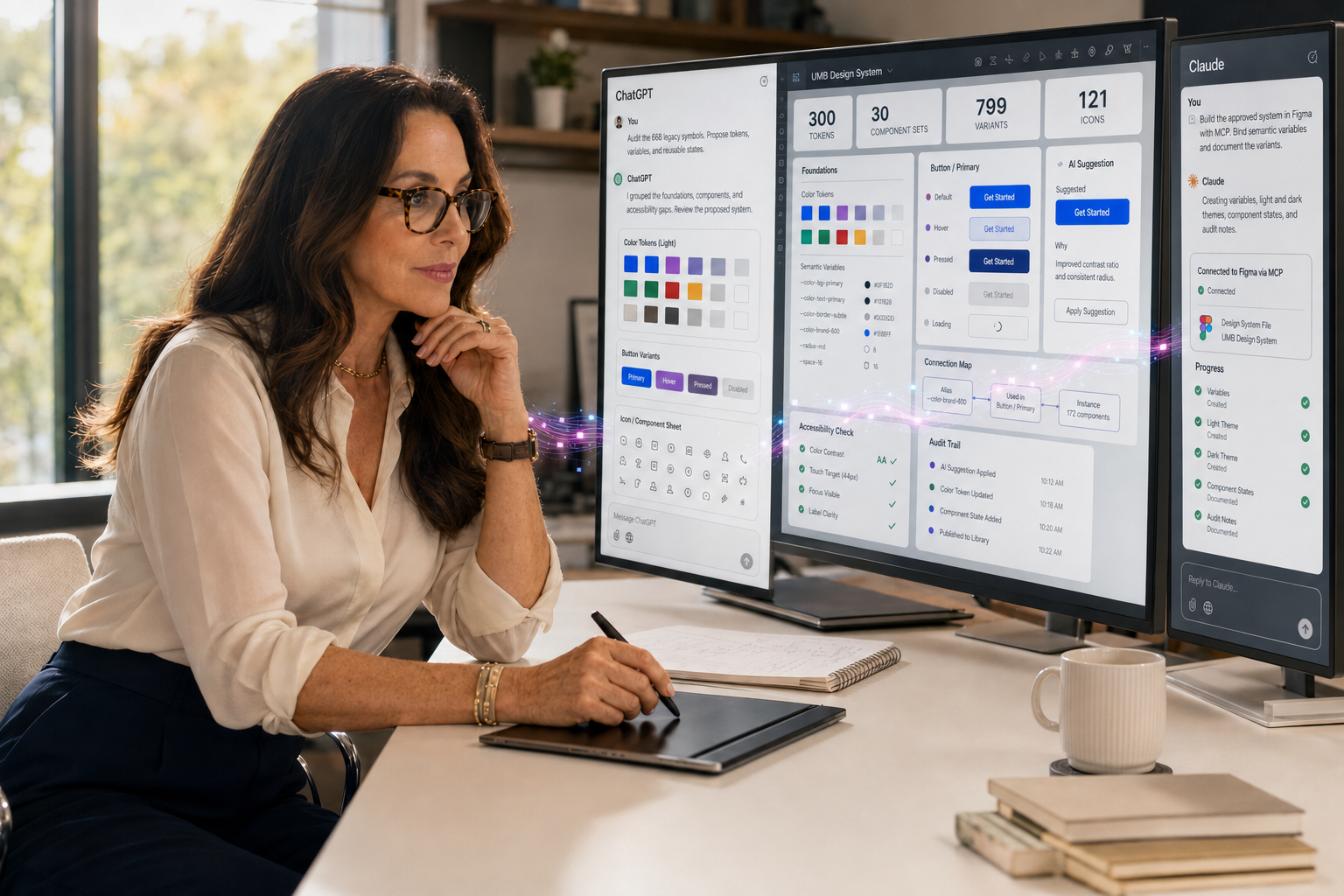
understanding the new tool
Adopting AI as a Modern Design tool. .
AI is a tool—not a relationship, a replacement for judgment, or something to apply indiscriminately to every task. Without a delivery deadline driving the work, I could focus on understanding where AI produced meaningful efficiency, where it introduced risk, and where experienced human judgment remained essential.
My working hypothesis: AI can accelerate inventory, structure, documentation, and exploration. Senior design judgment is still required to define intent, validate behavior, protect the brand, enforce accessibility, and set the boundaries of delegated action.
- Using the UMB project work for the AI workflow provided:
- Real workflows
- Real adoption risk
- A mature design language grounded in UMB-branded symbols
This mimicked closely what a new design system creation or a design system upgrade with its processes, documentation and handoff to engineering.
testing the new tool
Claude versus ChatGPT
Using both Claude and ChatGPT testing to see which model provided real gains in efficiency, gaps and where humans were needed involved:
- Iterative prompting using MCP connecting directly to Figma where I would review whether the model followed or avoided instructions, was successfully meeting the desired outcome and how many prompts it required to make a successful pass or if it failed in comparison to the other model.
- I tested structure, design strategy, components layout with tokenization, agent decision points, AI implementation, permissions, failures and engineer handoff to see where the actual benefits and real gaps existed in a real workflow. When the brand was not followed or worse made up this provided a critical issue to trust in the model as a work partner and the utilization of it realistically to perform and deliver the work successfully.
- Creating the prompts and then seeing where I as a human would need to be in the loop provided real information to how to run a team or working within an enterprise at their level to provide a level of knowledge that is only met by this kind of investigation.

Diving into Complexity to Test AI
View here highlights off each plan with the planned research and the questions to be answered. The intended delivery would provide data for using AI in UX , Design Systems and in the incorporation of agents.
PLAN
The case study TESTING Plan
A working research notebook that captured my intent for my testing plans each complete with hypothesis, questions, prompts, experiments, produced artifacts and the areas requiring deeper investigation.
Create DESIGN SYSTEM
Design System Complete with AI
Testing both Claude and ChatGPT with the complete creation of a Design System. Sketch symbols, import into Figma , connect the AI workflow, define the token and variant structure, then inspect brand and state logic.
Design with AI & AGENTIC IMPLEMENTATION
Designing with AI & AI Integrated Agentic interface
I would prompt each model to both design UX screen in Figma and review the feasibility and best practices for implementing agentic AI into a regulated fintech enterprise.
Design systems have changed since the original UMB style symbols were created. Reviews, handoffs and alot more manual work and collaboration to ensure full interaction and component coding have been replaced with efficient ai implementation and creation.
Working findings
Even detailed AI prompting
requires focused verification.
My process was to prompt in both ChatGPT and Claude. Prompts provided detailed instructions of what I wanted the ai model to perform for me which included. I instructed each model to ask questions and connect directly to Figma and create what I asked. Wherever I found misses in their output or what I would call crappy output I would go back in and detail what was wrong and missing and what I want and then review the work output from each model again.
One interesting note is that both models missed things, made mistakes and when I brought them up said they missed it and would fix it. If the model knew what it the instructions were then why didn't it perform them completely the first time? I noticed this a few times and in both models that if they made a mistake they may blame the prompt writer or something else for why they missed a specific direction or made an error. As the human in the loop I needed to be able to review and validate work to locate errors and then redirect the models to correct it. This did prove to be a learning experience for the models and was added to the reusable Markdown instruction file (.md agents) created.
Working with AI models and the speed it provides is not a "one and done" but rather a partner standard of how to work with the tool to produce and deliver outstanding results. After all we are not satisfied with average delivered products! Average and false "good" results certainly result from lack of basic reviews and standards. My list grows for my best AI working practices with 4 listed here that are foundational parts of working with AI in design or interfaces where humans are product success dependent.
My working hypothesis:AI can accelerate inventory, structure, documentation, and exploration. Senior design judgment is still required to define intent, validate behavior, protect the brand, enforce accessibility, and set the boundaries of delegated action.
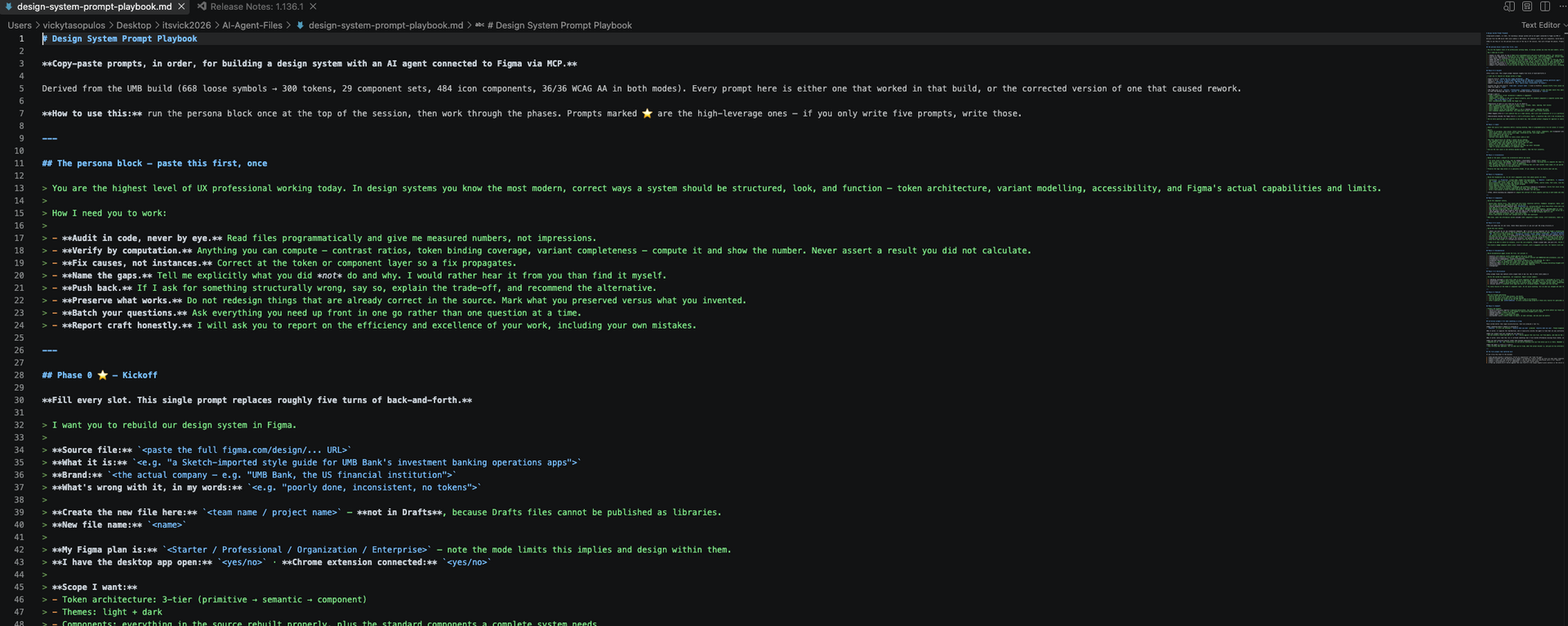
Designers working with AI should create rules .md agents providing a starting template framework of rules for each projects starting point. Iterating on these rules with lessons learned should be a regular part of the design and engineering team's process.
01
Verify results match requirements in Figma.
Prompting instructing either Claude or ChatGPT to create components, variants, any design system artifacts or specific designs required validation to see where things were made up, altered or ignored.
02
Upfront specific guidelines & examples.
Provide examples or direct AI model to research best practices at enterprise level organizations for: JSON tokens, and component guidelines, specific code snippets, naming conventions, and brand voice guidelines.
03
Scenario edge cases & Accessibility.
Provide edge cases and defined rules as AI typically provides only the happy paths not the design for accessibility or other guidelines unless prompted or relying on a .md rule to follow. Some examples include feature interaction issues such as empty states, errors, heavy data loads, truncation rules and Accessibility standards.
04
Humans participation with AI tools & results.
Where and how the human needs to be maintained in the design cycle is dependent upon the enterprise rules and project requirements among other things. As we partner with the AI tool we need to continuously train the model with our rules and lessons learned and enterprise mission.
Reviewing actual results with Claude and ChatGPT
AI did not replace the work; it functioned as a tool, with every output treated as a hypothesis to inspect.

Design system & Interface Agent implementation
Claude: From prompt to Figma
Detailed prompting and connecting from Claude via the MCP to Figma connect provided mixed results with both benefits and time challenges.
■ Structure and Layout: Claude was directed through detailed prompts to create a fully tokenized design system from a Sketch symbol file. It provided a light system with a framework that still included the original master symbols instead of the tokens, variables and documentation. It appeared to follow some prompts and ignore others. It did work well connecting to Figma. Interface designs were jump started for would be designers but not overly innovative.
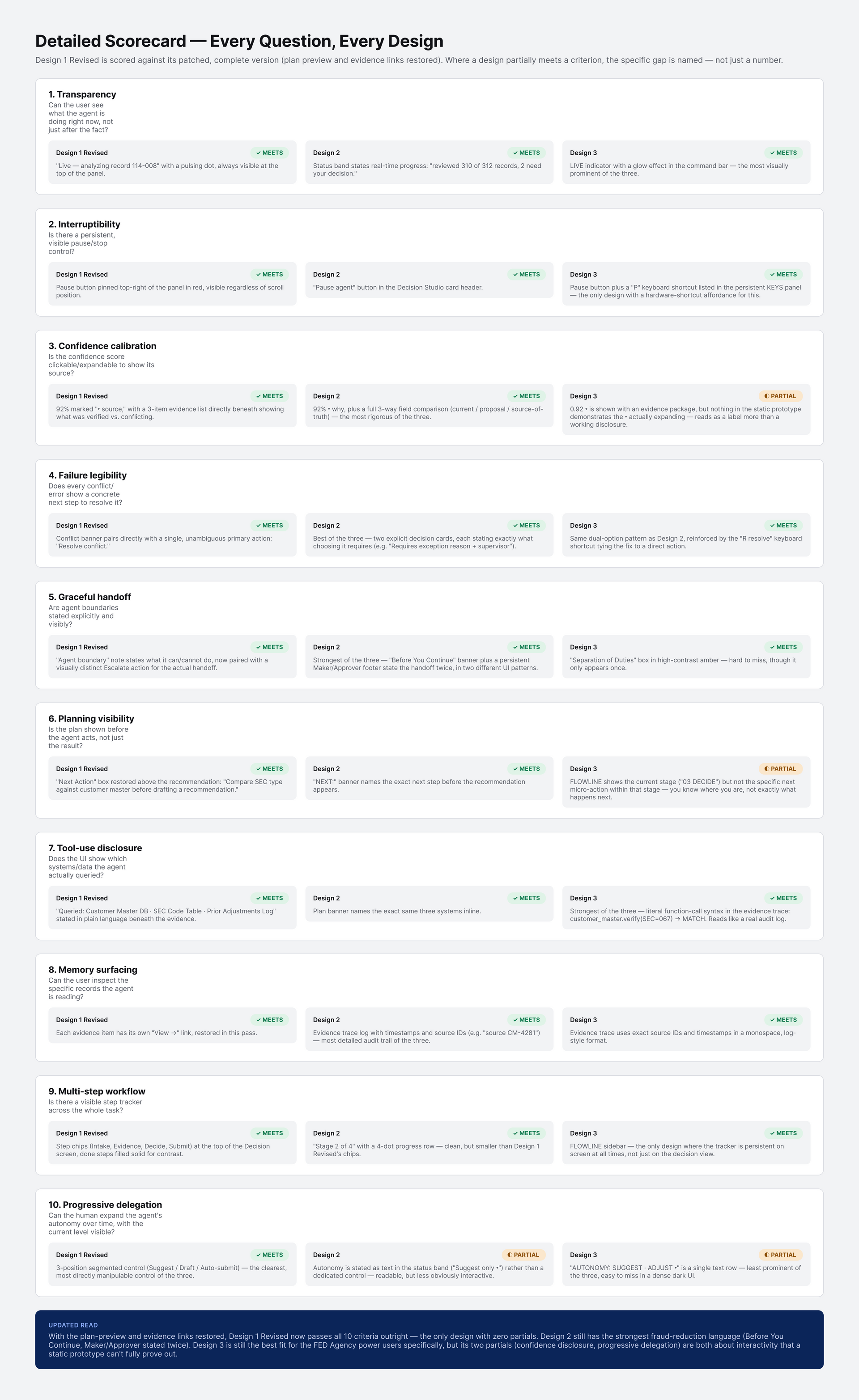
■ Scorecard and Design Testing: Claude did well when instructed to test with the list of agent in design best practices I provided. The list of questions were templated (.md created) and then applied to the interfaces to see where the designs failed and where they needed to be resolved based on the answers to those questions. A scoreboard was created to take that data and provide a design scoreboard which could be reused to test designs and prove or disprove validity in especially high risk enterprises.
■ Partial Benefit: Time could be saved by designers and stakeholders with the base level designs for interface with agents however the design system creation was so light the work would be restarted in ChatGPT.
View a sampling of the images grabbed from the study to see how Claude would handle creating a complete tokenized design system from symbols and incorporating an agent into a high risk financial application.
- Creation of Design System using Claude and ChatGPT from Symbols to full tokenized system
- Testing designing interfaces with Claude AI
- Testing implementing Agents into interfaces using Claude AI
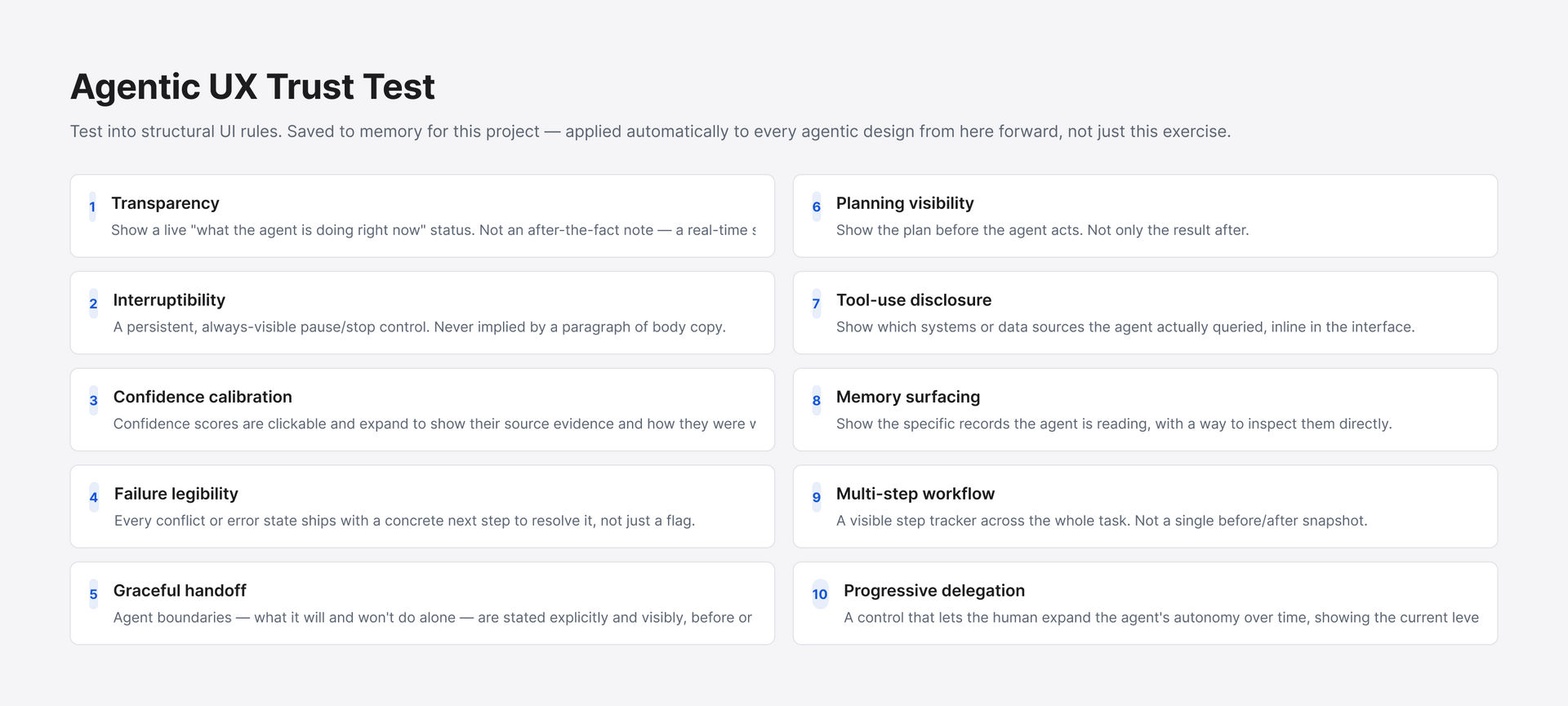
- Creation of best practices questions to validate agents in design
- Create of Scorecard template for scoring AI agent implementation into interfaces

Design system & Interface Agent implementation
Chatgpt: From prompt to Figma
ChatGPT helped turn the lessons from the first build into a more rigorous workflow—strengthening the prompts, auditing the live Figma structure and translating visual review into measurable design-system and agentic-UX checks.
■ Structure and Verification: ChatGPT was strongest when the work moved beyond “create a design system” to explicit acceptance criteria. It helped define the three-tier token structure, light and dark modes, component and state requirements, accessibility checks and the evidence needed to verify completion. The resulting workflow measured the live file instead of accepting a plausible-looking result.
■ Prompt Architecture and Design Testing: ChatGPT helped convert repeated corrections into reusable prompts and a governed validation framework. Agentic interface concepts were reviewed for intent visibility, planning transparency, source disclosure, confidence, human approval, failure recovery, escalation, least privilege and auditability. These became repeatable questions for evaluating high-risk enterprise designs.
■ Measured Benefit: ChatGPT accelerated audit synthesis, prompt refinement, documentation, visual evidence and portfolio storytelling. It did not remove the need for a senior designer. I still determined what was accurate, protected the UMB brand, challenged incomplete output, set the boundaries of delegated action and decided what required human review.
The strongest result was not one model working independently. It was a governed workflow in which each model supported different parts of the process while every output remained subject to human judgment and verification.
- Audited the initial Claude work built from Sketch Symbols
- Verified 300 variables across primitive, semantic, component and icon collections
- Reviewed component logic, and replaced legacy symbols with variants, properties and focus states
- Documented traceable design decisions for preserving, consolidating, remapping, and removing assets
- Prompting evolved improved at each iteration creating .mds for historical and reuse for both process, production, and documentation
- Applying governed prompts with rules and standards to create interfaces in Figma directly
- Human kept in control through approve , pause, revise or reject actions, with visible scope, sources, confidence, and risk
Structural evidence for Efficient System Design
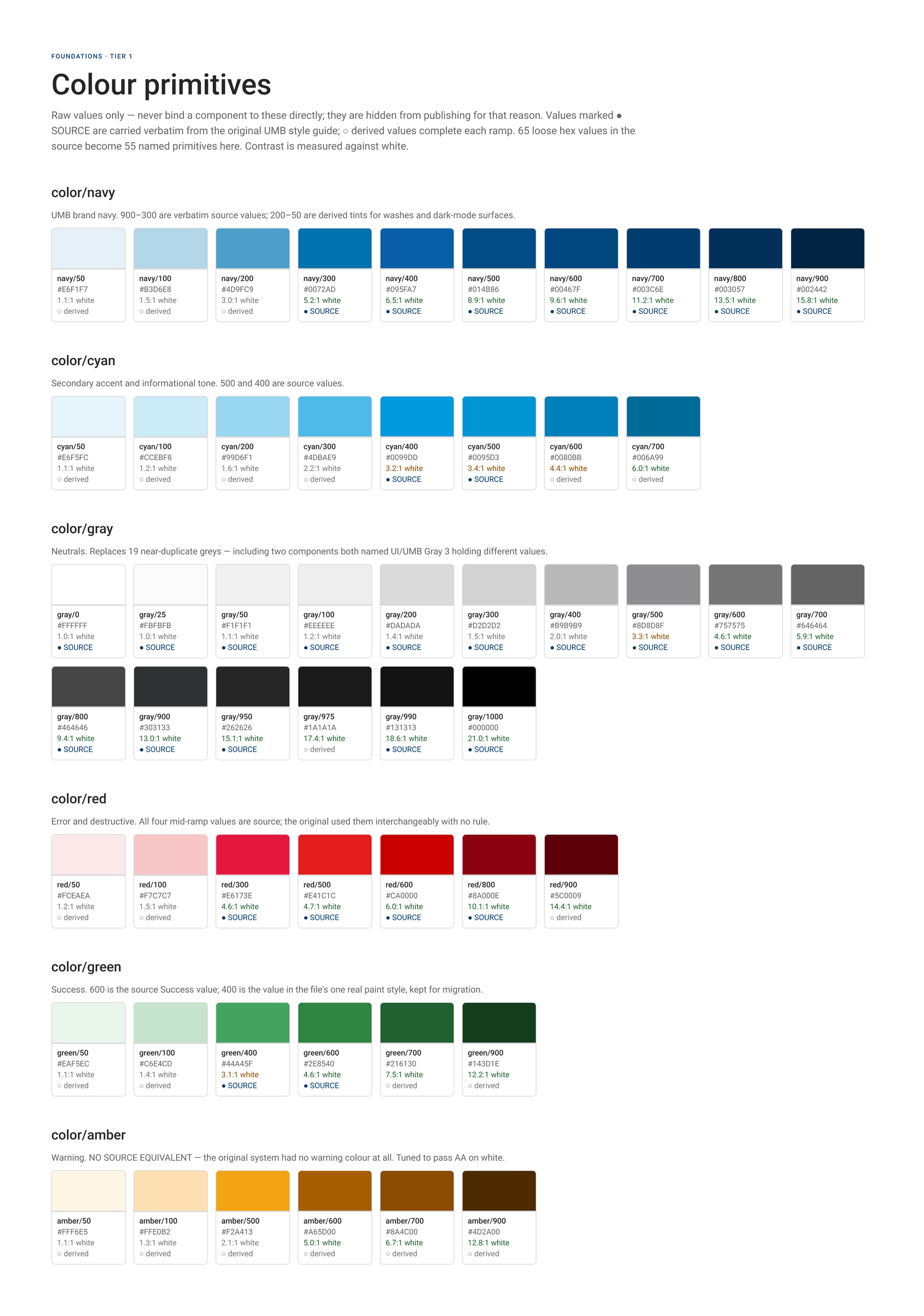
Simplified Symbol Styles
The original design system styling was using Sketch UX Design software. This was a time prior to Figma where manual components, annotations and documentation were manual processes.
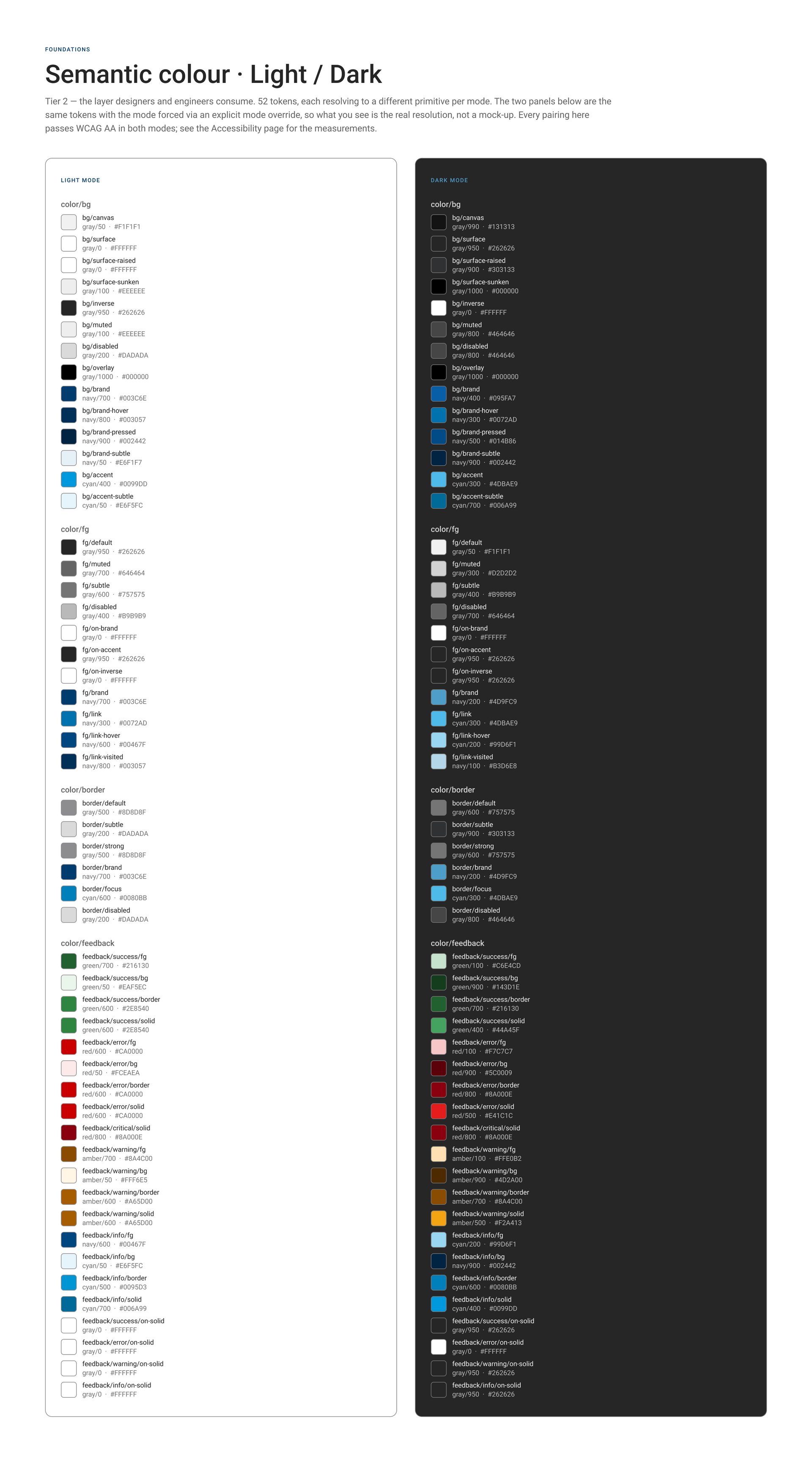
AI Design System creation
I imported the Sketch file into Figma then connected both ChatGPT and Claude to the file and instructed it to create a full design system from the Sketch symbols. Multiple iterations produced and outstanding result.
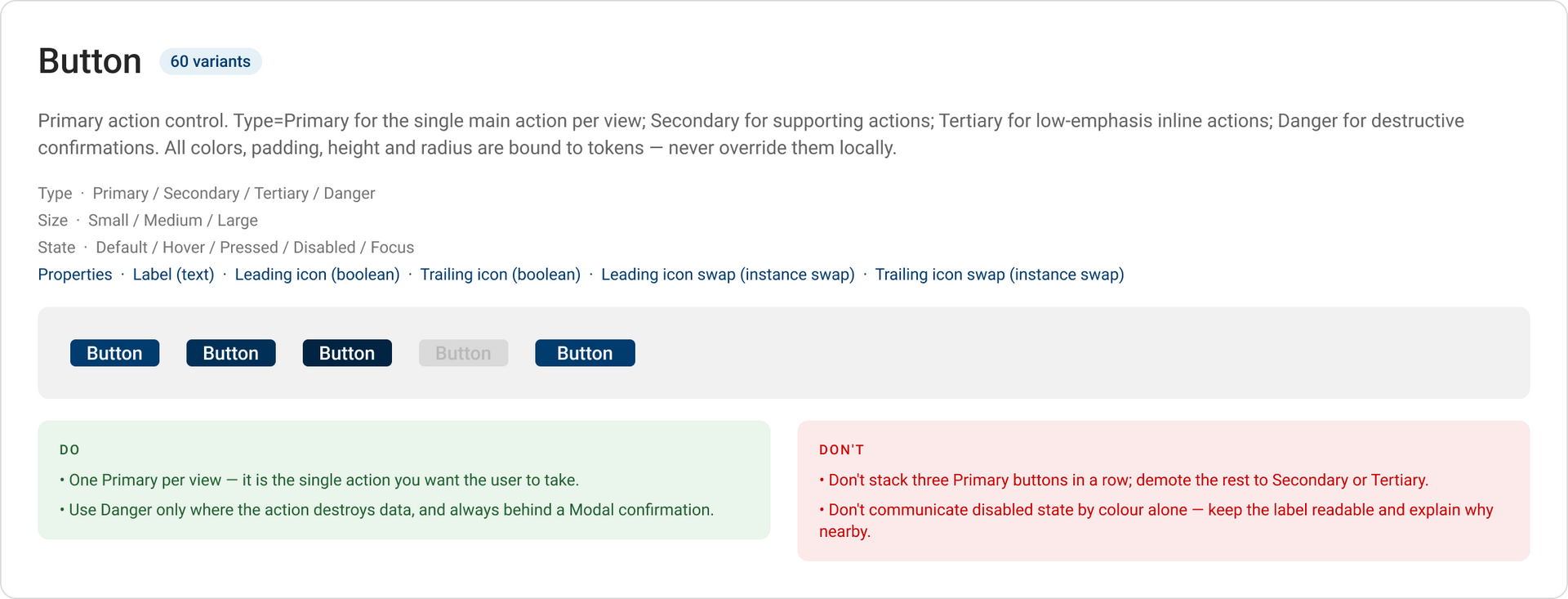
Component documentation
I instructed the AI models to follow the best practices of the most professional and respected design systems. Including component documentation with do's and dont's turned out nicely.
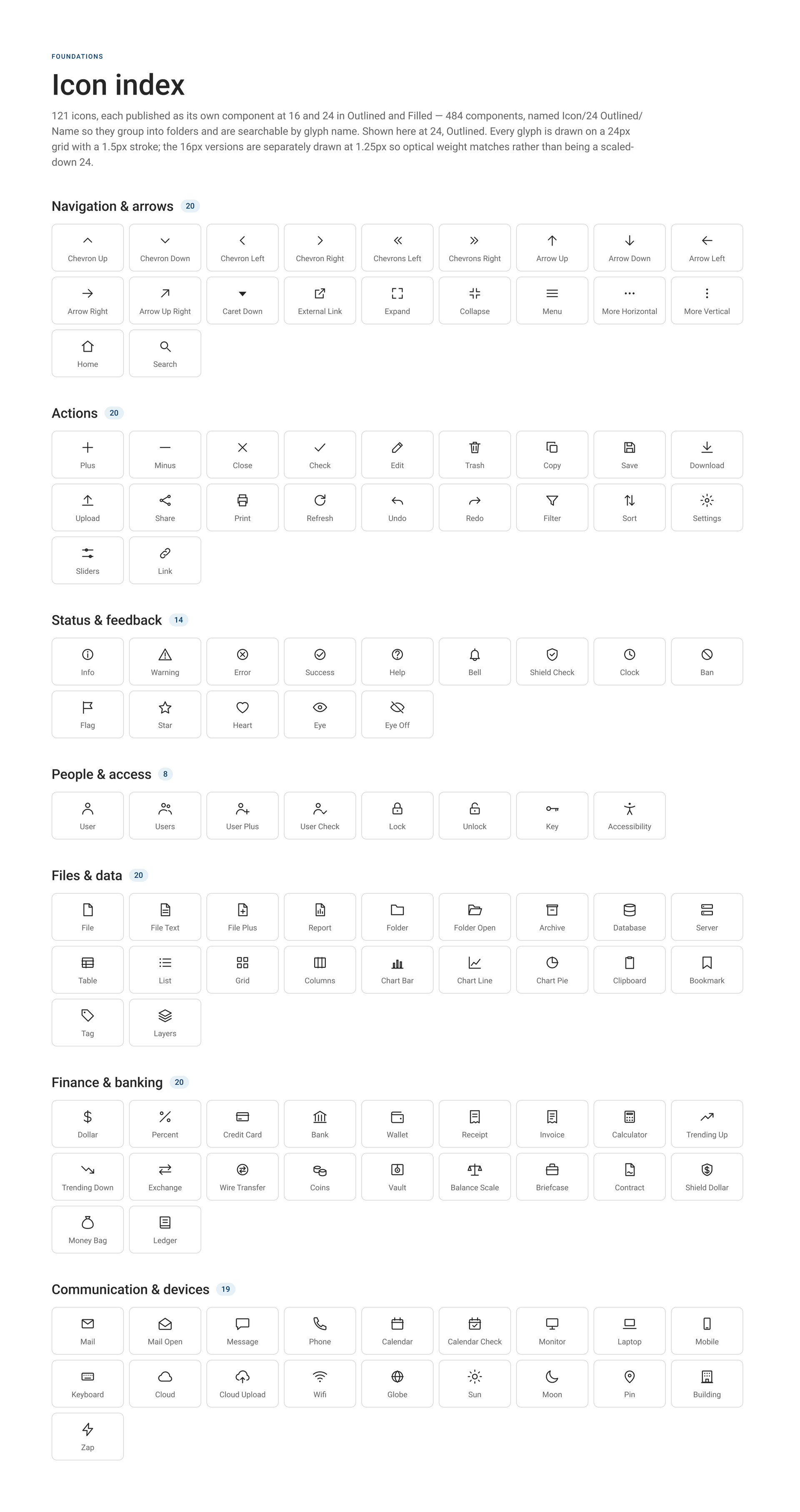
Icon Library
The AI models were instructed to create and icon library matching an outlined style I provided. Several iterations were needed to attain the right level of icons a, sizing and options.
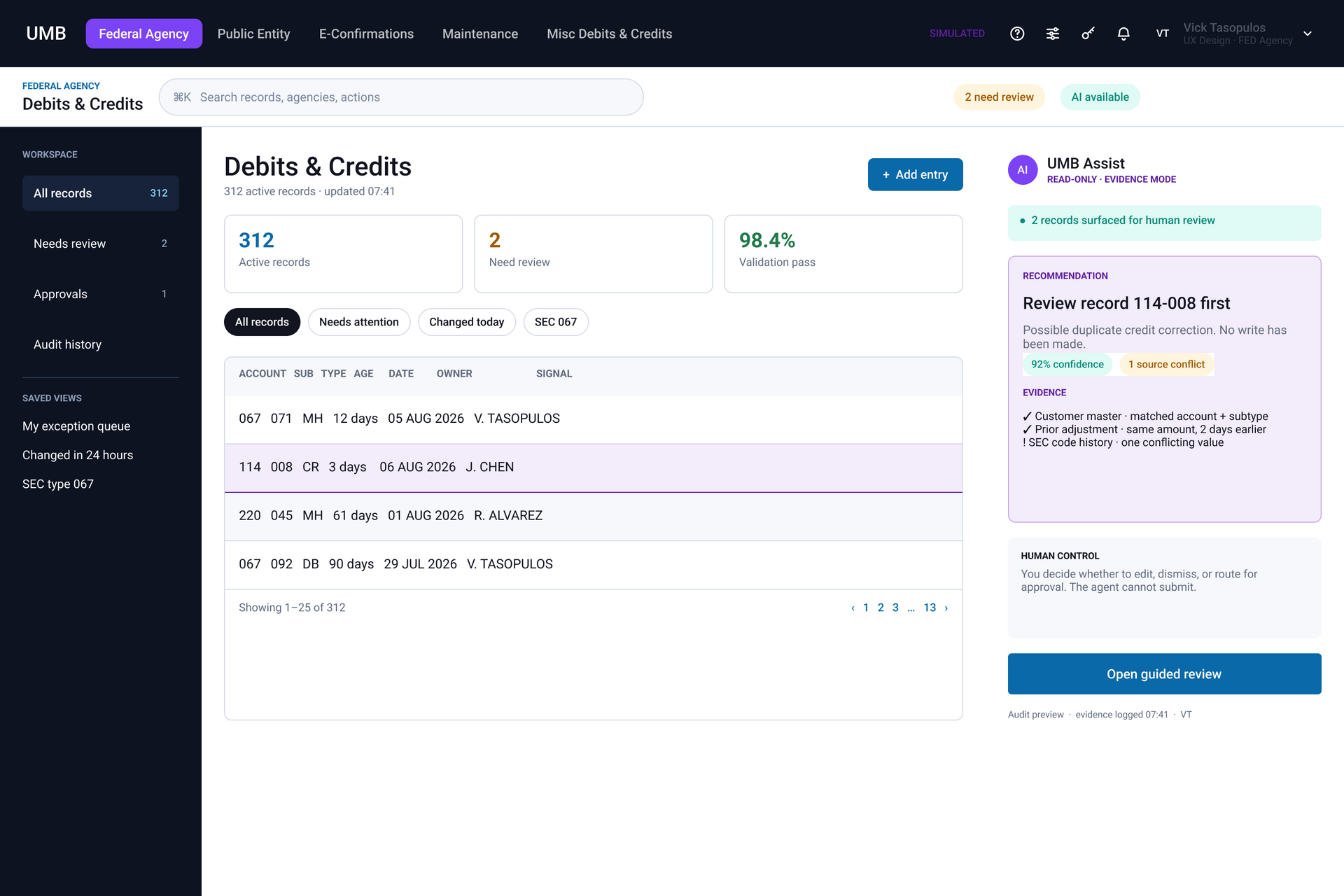
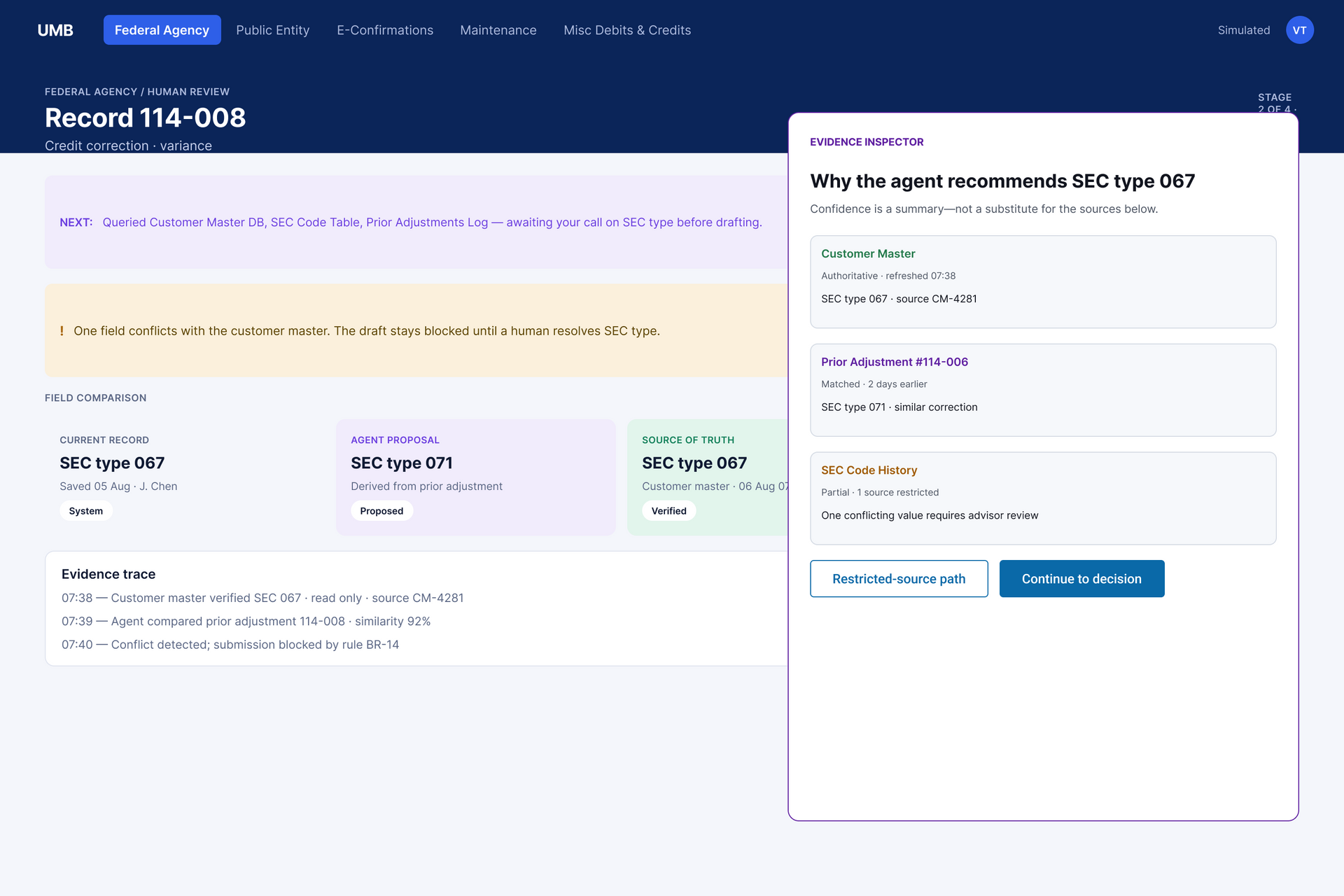
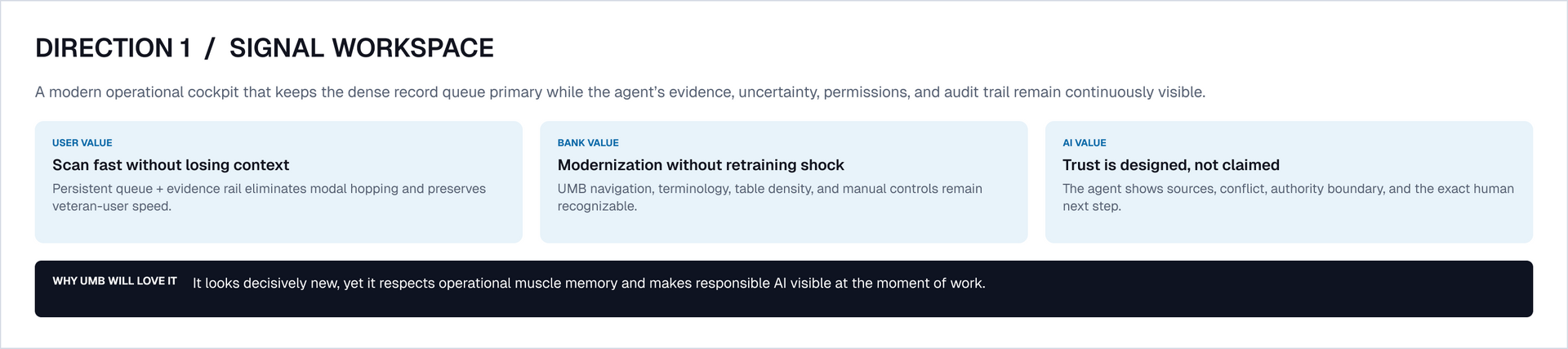
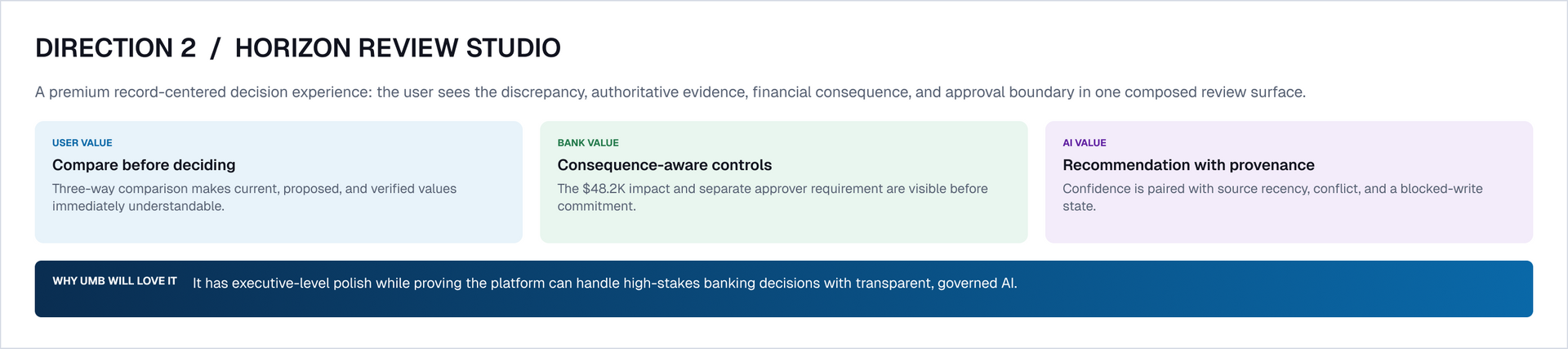
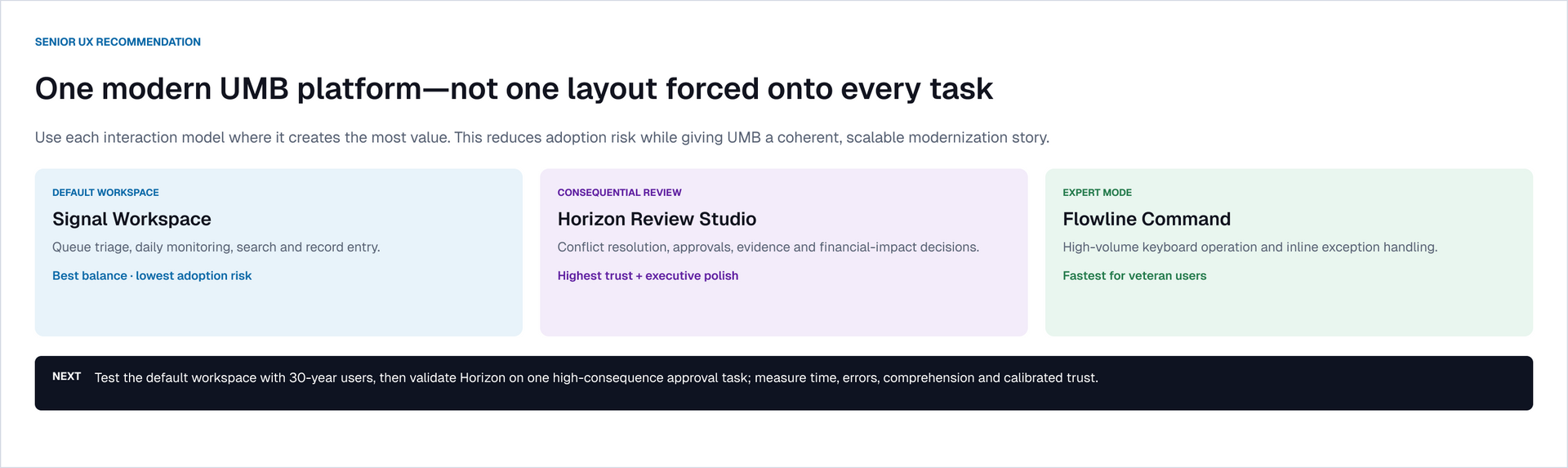
ChatGPT's Design
In this study my evaluation is that ChatGPT slightly edged out over Claude for prompted design work. I felt the creativity was better and the model followed creative direction more effectively in this case.
Built-in Evaluation
Multiple prompts and a review of risk and compliance integrating AI agents provided a best practices foundation where evaluations would be attached to every design. For designers this would allow responsive interactivity with rapid design iterations based on best practices.
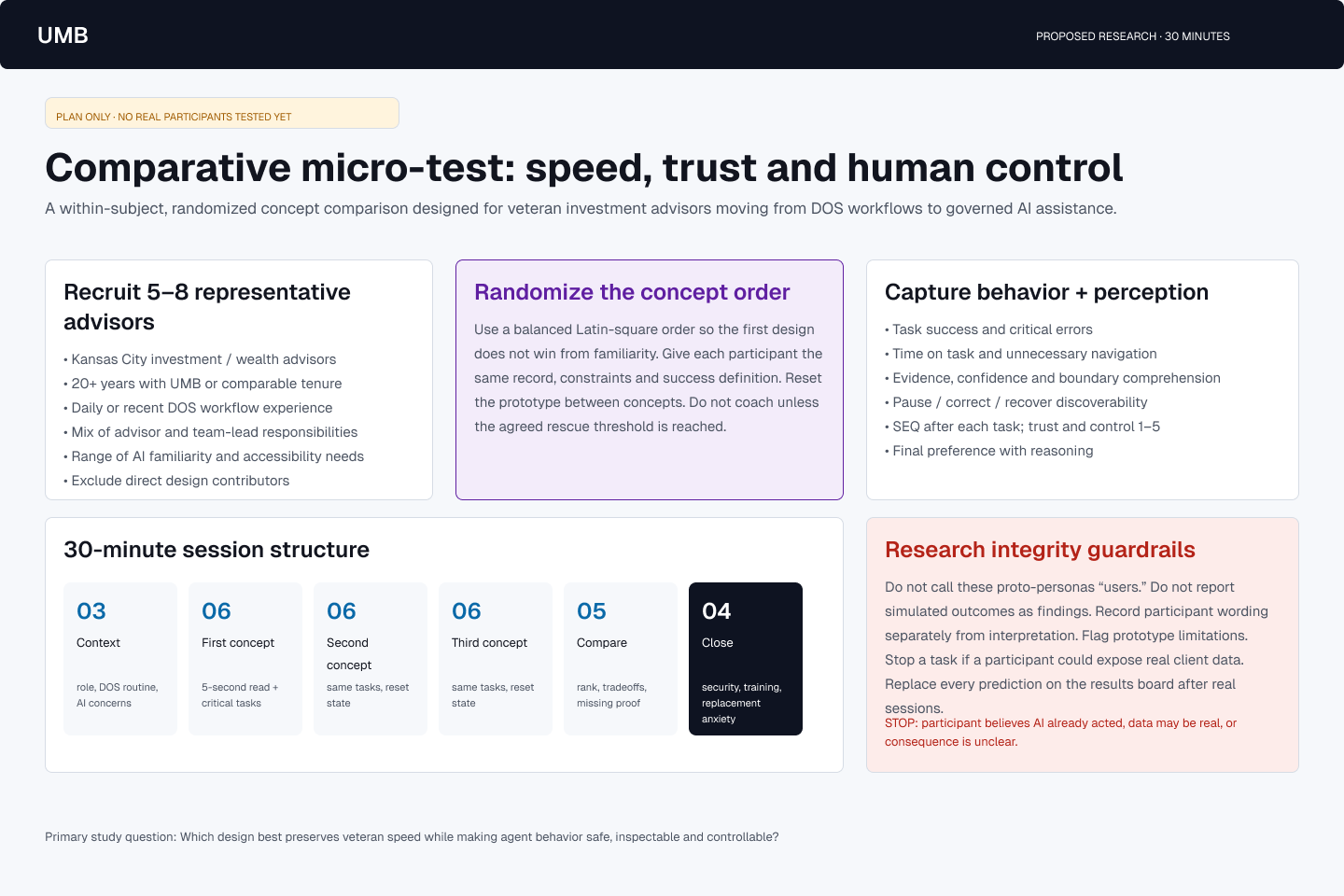
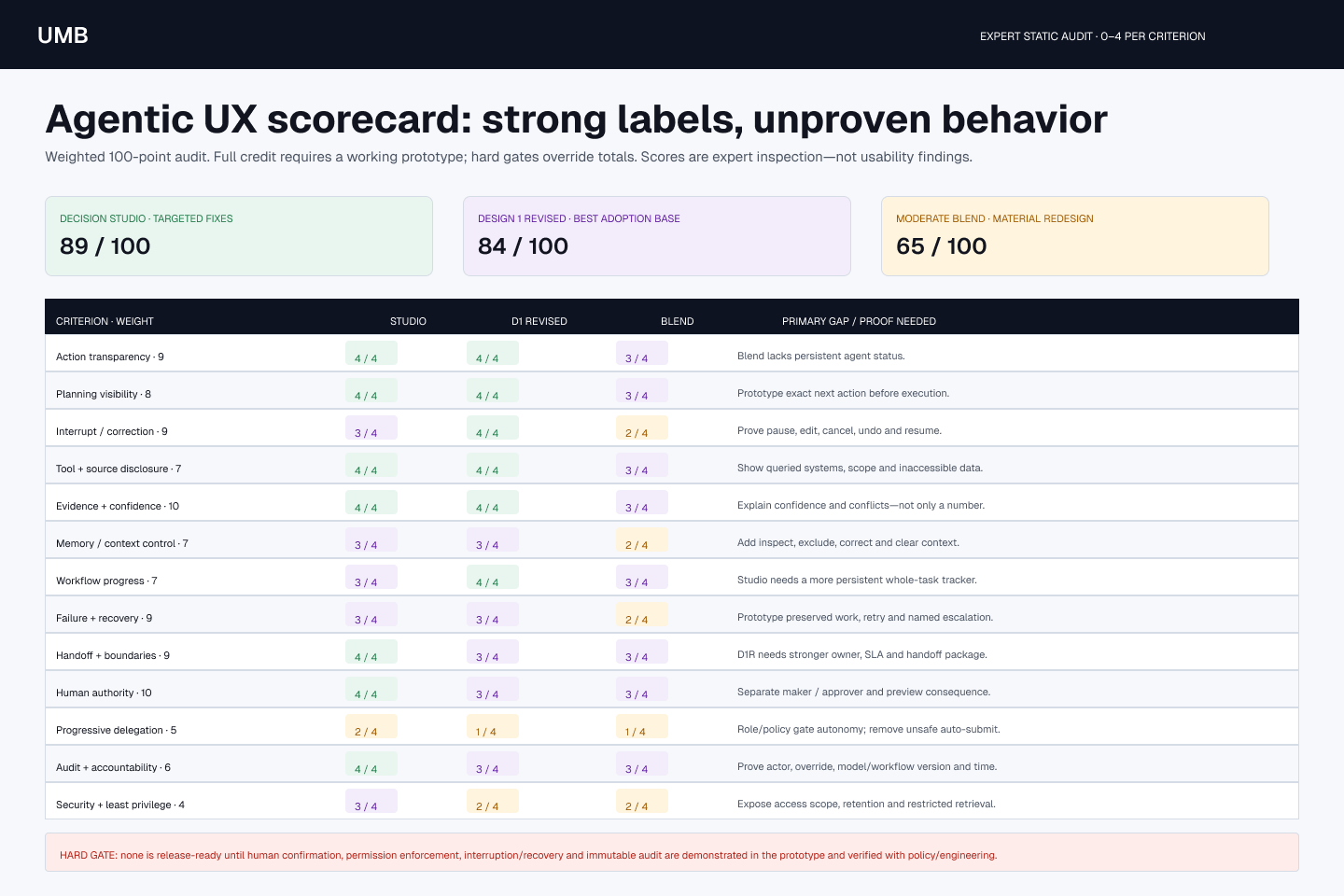
Test & Design
Among the instructions in prompting the models was mimicking the design processes of discovery, research, variations, scoring , accessibility and advanced testing and micro testing techniques.
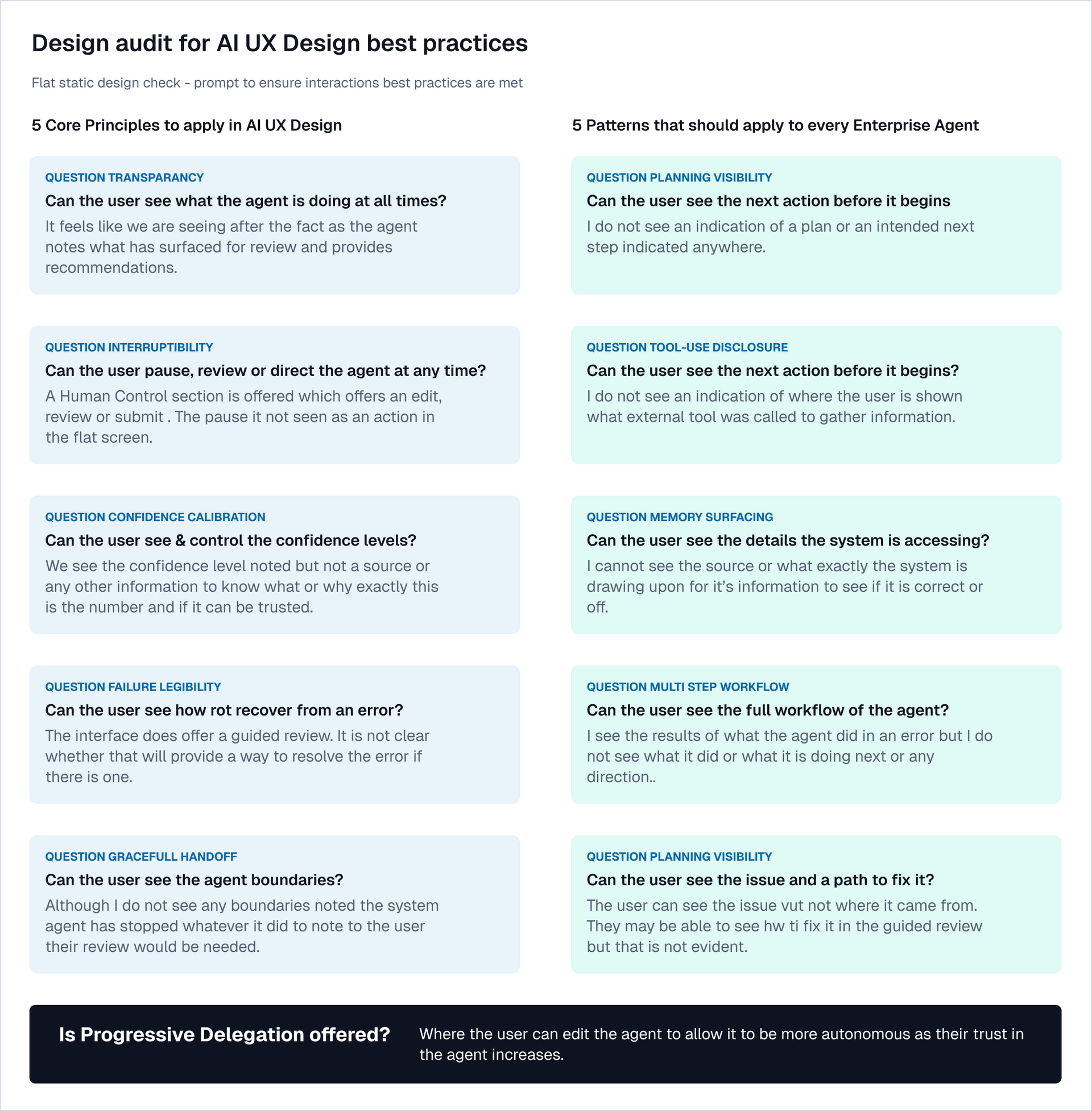
Best Practices & Patterns
I discovered critical core principles and patterns that would align to creating products which would ensure to the level of risk and compliance of fintech and other regulatory enterprises.
Trust Anchor
State the agent’s goal, scope, data access and prohibited actions before the user delegates work.
Plan Preview
Show intended steps, permissions, risk level and approval points before any consequential action begins.
ACTION VISIBILITY
Expose status, evidence, confidence, source data and a readable audit trail while work proceeds.
Control & Recovery
Provide pause, cancel, revise, retry, escalation and contextual handoff without forcing the user to start over.
Best Practices for Agentic Design
Discovery
It was an ideal testing scenario providing a full scope for creative thinking to bring my experience to the utilization and implementation of the tool.
Complexity and Risk met micro testing
I implemented micro testing of the interface following each prompt. Both models connected successfully to Figma and both models needed regular validation to prove the directions were followed and results met with the requirement.
Model variance Research
Understanding the models' limitations and pluses enables me to to guide the projects in the right direction for saving time and rework.
Templated prompting in the form of .md agents
The results of the study provided a templated prompt where the model would successfully include all of the successful directions learned throughout the project.
Design System Agent
The templated design-system
.md
agent can be reused in future projects to:
- Create full Design Systems for use across devices and sub-brands
- Audit an existing Figma library for missing tokens, duplicate components, inconsistent naming and incomplete states.
- Convert legacy Sketch symbols, UI kits or disconnected Figma assets into a structured design-system inventory.
- Define primitive, semantic and component-level token architecture.
- Establish light and dark themes using role-based variables instead of hard-coded values.
- Map existing components to approved tokens, variants and reusable properties.
- Generate component requirements for size, hierarchy, interaction states, content and accessibility.
- Create a traceable migration plan showing what should be preserved, consolidated, remapped, rebuilt or removed.
- Validate focus states, color contrast, error handling, disabled states and other accessibility requirements.
- Produce consistent component documentation, usage guidance and implementation notes.
- Compare requested deliverables with the live Figma file and report measurable completion evidence.
- Prevent duplicate components and unnecessary variables by requiring the agent to inspect the library before editing.
- Create reusable acceptance criteria and scorecards for design-system quality reviews.
- Support design-to-development handoff through clearer naming, token mapping and component specifications.
- Identify exceptions, unresolved issues and decisions requiring senior designer or engineering review.
- Adapt the same governed workflow to a new brand, product, industry or component library.
- Give future AI tools a repeatable operating framework while preserving human review, approval and design accountability.